Facebook Publishing Troubleshooting
Understand safe Meta diagnostics and check Page-specific Facebook publishing access without exposing credentials.
Start with the receipt
A Facebook failure can happen at different stages. If initialise upload and upload media succeeded but publish container failed, Meta accepted the Page credential and video upload for those earlier steps. That does not prove why the final publish was blocked. Use the final stage's safe diagnostic instead of guessing from the top-level code.
Safe diagnostic fields
The public Wahlu UI and API expose only the Meta Graph code and optional subcode. Provider user text remains private, and the provider trace remains private for internal support correlation.
| Field | Why it helps |
|---|---|
| Graph code | Meta's numeric error family, such as 190, 200 or 368. |
| Subcode | An optional numeric detail that can narrow the cause. |
Wahlu does not show provider tokens, raw Meta payloads, request bodies, request URLs, secrets or the original media as public failure diagnostics. Do not paste those into a support ticket.
What the error class can mean
Connection or authentication
190 and its subcodes
Likely causes: The Page token is invalid or expired, the authorising Facebook profile changed security details, or Meta requires a login checkpoint.
Check next: Open Facebook as the authorising person and complete any security prompt. Reconnect only when Wahlu or Meta identifies an authentication failure.
Page or business permissions
10, 200, or a Page-authorisation subcode
Likely causes: The person may lack full control of the Page or its Business Portfolio, or the Wahlu business integration may not have access to that Page.
Check next: Check Page access, Business Portfolio access, the Page asset assignment and granted business-integration permissions.
Media, content or parameters
100 or a media/content subcode
Likely causes: Meta rejected a field, video property, link or content rule at the stage shown in the receipt.
Check next: Compare the post with Meta's current Reel requirements. Do not send the original media or raw request to support; send the safe fields below.
Temporary service or rate limit
1, 2, 4, 17, 341, or a posting-rate subcode
Likely causes: Meta may be unavailable or applying a request, app, person or Page rate limit.
Check next: Follow the retry status shown by Wahlu. Do not repeatedly reconnect or manually resubmit a non-retryable receipt.
Meta blocked or restricted the publish
368, including subcode 4854002
Likely causes: Meta blocked or restricted that publish, but these numbers do not tell Wahlu the specific reason. The target Page, its access relationship, the final Reel operation or the content are possibilities. Code 368 and subcode 4854002 do not prove a Page, account or policy violation.
Check next: Check Page Status, Account Status and Business Support Home. Keep the public Graph code and optional subcode for support.
Duplicate or link handling
506 or 1609005
Likely causes: Meta may recognise the post as a duplicate or reject how a link is attached.
Check next: Review the receipt and post details before changing anything. Confirm whether Meta already published it before retrying.
Wahlu or unknown failure
No safe Meta diagnostic
Likely causes: Wahlu may have failed before Meta returned a usable error, or Meta may have omitted diagnostic detail.
Check next: Send Wahlu the publication or run reference. Support can correlate the failed stage and timestamp. Never send a token, raw response, request URL or request body.
Open the Page settings, not your profile settings
Facebook keeps your personal profile settings separate from each Page. Open the account switcher and choose the Page first. Check that the Page name and picture are active before opening Settings. If Settings shows your personal name, switch back to the Page and try again.
From the Page, open Settings, then find Page access. Meta may place it under Page setup or use slightly different navigation labels.
Confirm Page access and Full control
The Facebook account used to connect Wahlu should appear under people with Facebook access and show Full control. Full control normally covers content, messages and calls, community activity, ads, insights, and managing Page access or permissions.
Full control is an important check, but it does not prove Meta will accept the final Reel publish. Keep checking the Page-to-business relationship and the exact safe diagnostic.
If the Page appears under Other assets
- Open Meta Business Suite's Page settings. If the Page is listed under Other assets, it is not yet assigned to a business portfolio.
- Create or select a business portfolio that you own, then choose to add an existing Facebook Page.
- Select the Page when Meta shows the available business assets, then continue.
- Keep Full control for the connecting person, review the Page and business portfolio, accept Meta's terms, then select Add Page to complete the move.
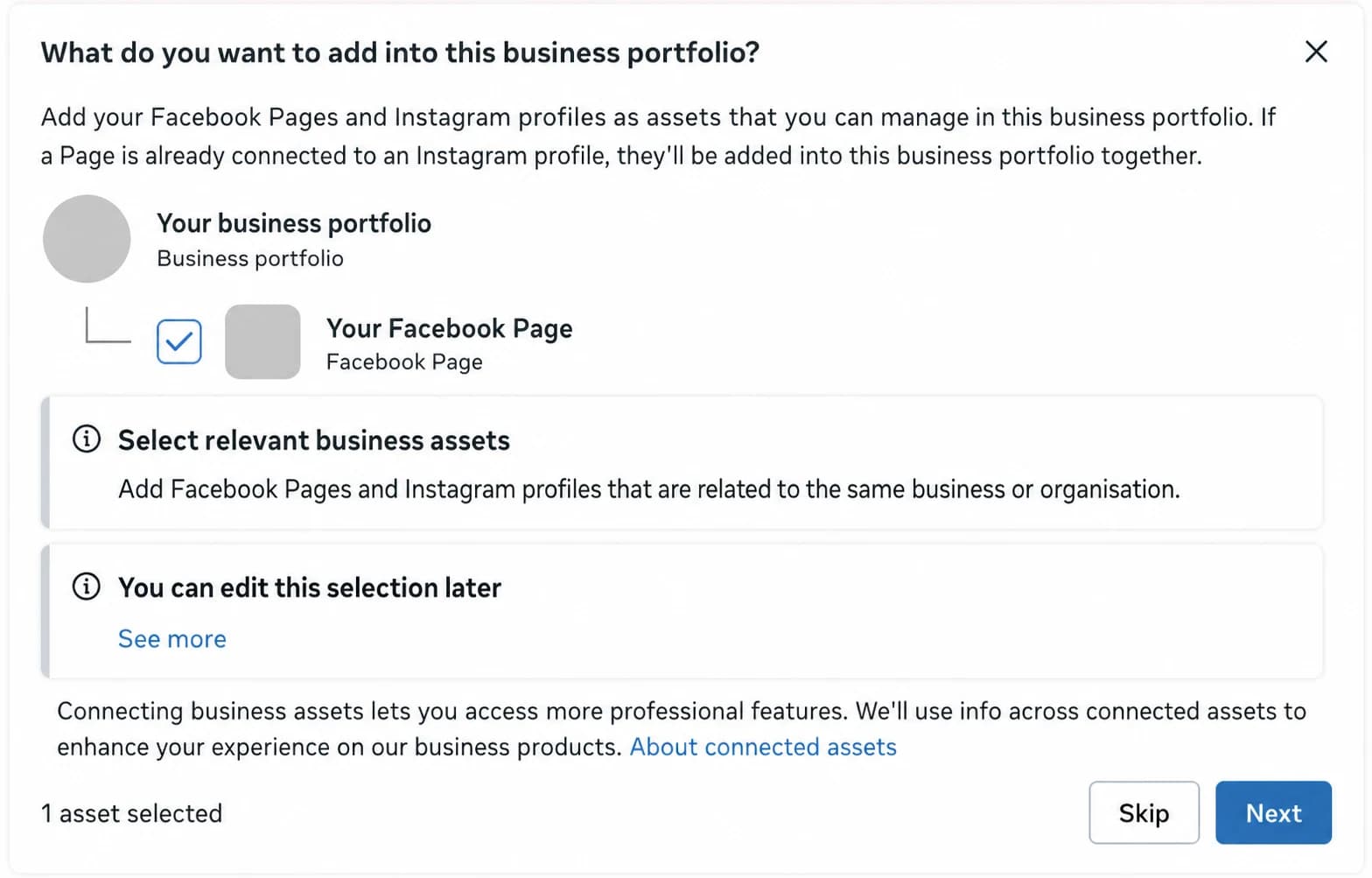
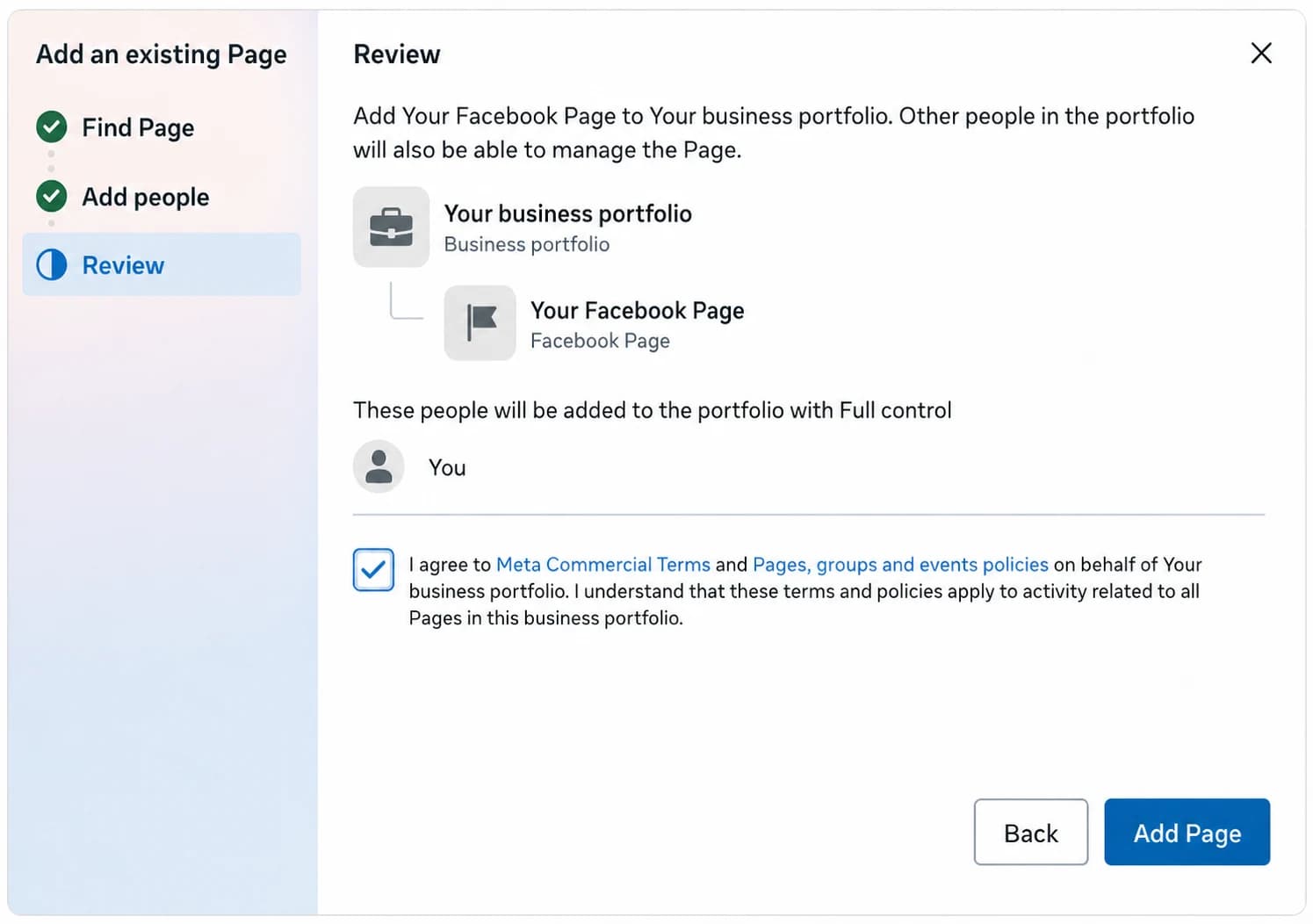
A missing business portfolio assignment is a likely cause worth checking and a prerequisite for this troubleshooting path. It is not a proven universal explanation or fix for Graph code 368 or subcode 4854002. Page Status and Account Status can still look clear while the relationship or final publish is blocked.
Only add a Page that you own or are authorised to manage. A business portfolio controls where Meta manages that Page's business access.
If Meta starts an identity review
Meta may flag account or business setup for an identity or suspected automated-behaviour review and ask for ID. Follow Meta's in-product identity flow. Meta may say the review will take several days.
- While the review is pending, do not repeat Page moves, portfolio changes, Wahlu reconnects or Refresh actions, or test publishes.
- Wait until Meta confirms that account access is restored.
- Then check Page access and the business asset assignment, reconnect or Refresh Wahlu once, and run one Facebook test post.
- If that test fails, do not keep retrying or reconnecting. Keep the safe diagnostic and send it to Wahlu Support or Meta Support.
Final checks
- In Facebook Business Integrations, confirm Wahlu still has the Page and publishing permissions originally granted. Do not reconnect unless the diagnostic identifies an auth or permission problem.
- Complete any Meta login, two-factor authentication, Page Publishing Authorisation or security prompt shown to the authorising person.
- Check Page Status, Account Status and Business Support Home separately.
- Instagram linkage matters to Facebook publishing only when it changes where Meta manages Page access. A Facebook Page can belong to a business portfolio without Instagram.
What to tell Wahlu Support
Copy the following fields when they are shown in the Wahlu receipt or History view:
- Facebook Page display name
- the publication or run reference, so support can correlate the failed stage and exact timestamp
- Graph code and optional subcode
Also say which checklist items you confirmed. Wahlu Support can use those fields to separate connection, target, content and Meta-side failures without needing your credential or media.